- NanoBits
- Posts
- How to build your first Claude Skill in under 30 minutes: Step-by-step tutorial for beginners
How to build your first Claude Skill in under 30 minutes: Step-by-step tutorial for beginners
Nanobits Product Spotlight

Monalisa Sethi
February 15, 2026

EDITOR’S NOTE
Dear Nanobits Readers,
Every week, I hear some version of the same complaint from readers: “I’ve finally found prompts that work…, and now I spend half my life copy‑pasting them into new chats.” One Reddit user put it bluntly: “The solution that comes to mind is to keep the prompts in a notepad and copy them, but this is not a very convenient solution.” If you’re formatting the same weekly report, rewriting the same kind of LinkedIn post in your brand voice, or re‑explaining your product’s ICP to Claude every single time, you’re feeling this pain already.
Claude Skills exist to kill that repetition. They’re not “fancy prompts,” as one r/AI_Agents commenter said, but “saved instruction packages that teach Claude how you work. So instead of re‑explaining, you’re re‑using.” Another community cheatsheet summed it up nicely: “Long prompts break down because context gets noisy. Skills move repeatable instructions out of the prompt. Claude loads them only when relevant.” That’s why people like Simon Willison are calling Skills “awesome, maybe a bigger deal than MCP,” and predicting a “Cambrian explosion” of shared workflows this year.
In this issue, here’s what we will cover: what Claude Skills are in plain English, why they matter if you’re a marketer, product manager, or an operator, how they differ from projects, plug‑ins, sub‑agents, and Cowork, when to use each, and how to build a tiny first skill that saves you from ever re‑typing that perfect prompt again.
What are Claude Skills?
Think of Skills like teaching your favorite barista your exact coffee order. The first time, you explain everything: oat milk, extra hot, one pump of vanilla, no foam. After that? You just say "the usual" and they know exactly what to make.
Claude Skills work in the same way. They are Claude’s way of letting you stop re‑explaining yourself every time you open a new chat. They’re small, reusable instruction packs – like mini playbooks or SOPs – that you save once and Claude can quietly pull in whenever they’re relevant, across chats and projects.
One Redditor described the difference nicely: “Pre‑prepared prompts are conversation starters. Skills are collections of guidelines, scripts, and tools that Claude automatically accesses when needed.” Instead of pasting your “how to write in our brand voice” prompt into every conversation, you turn that into a Skill; Claude can then load it whenever you ask for marketing copy, without you remembering the magic wording.
Another creator compared Skills to company SOPs, finally doing something useful: “They are basically specific Standard Operating Procedures for Claude… built for a very specific reason, where the steps are repeatable.”
Under the hood, Skills use “progressive disclosure", which means they activate only when they're actually useful. If you've saved a "format my meeting notes" skill, Claude won't randomly apply it when you're asking about recipe ideas. It reads what you're working on and thinks, "Oh, this looks like meeting notes. Let me use that playbook."

You can even combine several at once – for example, a persona skill plus a brand‑voice skill plus a “turn this into a newsletter” skill.

Practically, that means you move from clever one‑off prompts to a small library of reusable ways‑of‑working that follow you around wherever you use Claude.
Why is Claude Skill relevant? Why should it be important to you? What does it mean for your work?
Claude Skills solves the “I finally got the prompt right… and now I have to type it again tomorrow” problem. One Reddit user joked that their life had become “a graveyard of half‑remembered prompt recipes in Notion, all slightly different and none reusable.” One Twitter user captured this frustration: "I've been screenshotting my best prompts and keeping them in a Notes app like some kind of digital hoarder. This is not sustainable."
People are excited about Skills because it fixes three annoying problems at once.
Repetition: No more re‑explaining your brand, product, or formatting rules in every new chat. A content strategist on Reddit shared: "I had a 200-word prompt I pasted into every chat for writing LinkedIn posts. Now it's a skill. I get my time back."
Inconsistency: Your outputs stay consistent. A marketer on LinkedIn said Skills were “the first time AI consistently wrote like me across channels,” after turning her tone guidelines into a skill.
Lost workflows: A creator who tested 30+ community skills said it best: “My favorite prompts graduated into skills so my future self doesn’t forget how I did that thing.”
Simon Willison wrote that “Claude Skills are awesome, maybe a bigger deal than MCP,” arguing that MCP gives models more hands, but Skills give everyday users a way to encode their own reusable logic and standards without writing a line of code.
On Hacker News, commenters echoed this: once your best prompts become portable skills that travel with you across chats, projects, and even teams, the real bottleneck stops being “which API can I hit?” and starts being “what repeatable ways of thinking do I want to teach my AI coworkers?”
How do Claude Skills help different roles/job functions?
Skills land differently depending on your job, but the pattern is the same: you turn a repeatable way of working into something Claude can do on demand.
Marketers
One B2B marketer built a “brand voice + offer matrix” skill so Claude always writes like their company and tailors messaging to different segments; she said it was “the first time I didn’t have to fight the model to stop sounding like a SaaS landing page template.” Others use skills to standardize campaign recaps and weekly performance reports so every slide deck comes out in the same structure.
Product managers
A PM on Reddit shared two real‑world skills: one that turns rough notes into a PRD in their team’s exact format, and another that forces any feature idea through a fixed “problem → users → risks → rollout” checklist before it’s considered. Another uses a status‑update skill so every weekly update has the same sections, which their leadership now expects.
Sales / SDRs
Sales folks use skills as reusable playbooks: one for “research this account and score it against our ICP,” another for “draft 3 outreach email variations for this persona,” and a call‑prep skill that spits out a one‑page brief from a LinkedIn profile and website. One SDR wrote that after moving these into skills, “I stopped hunting for that one good prompt buried in Slack.”
Analysts / Ops
An analyst posted: "I have a CSV cleanup skill that spots common data errors we see, suggests fixes, and flags outliers. It's like having my own QA checklist built in." Operations teams are building skills for weekly report formatting, pulling the same metrics every time, without explaining what matters
How to create your first Claude Skill?
Open Claude App
Click on your profile
Go to Settings and click on Capabilities
Scroll down to the Skills section and click on
+AddUpload the zip file named
competitive-battlecard-skill(I will share this file at the end of the newsletter).You’re ready to use the new skill to spy on your competitor and gather intel for a deal that you’re both competing on.

How to add a new Skill to Claude
Create a competitive battlecard comparing your offering with the competitor’s using the new Claude Skill
Step 1: Pick One Narrow Task
Don't try to solve everything at once. Pick something you do weekly that follows the same pattern. For nanobits, I could create a "newsletter brand voice" skill. For a PM, maybe "feature spec template." For sales, perhaps "competitive battlecard generator."
Let me show you a real skill I built: the Competitive Battlecard Generator. It creates sales intelligence docs that help reps win against specific competitors.
Step 2: Write Down What Claude Needs to Know
Skills live in a simple document (usually called SKILL.md). Think of it like writing instructions for a really smart intern. Here's what mine includes:
What it does: "Creates battle-ready competitive docs with feature comparisons, win themes, trap questions, and objection handling"
When to use it: "Trigger when I mention competitor names or ask for battlecards"
What format to follow: Sections for competitor snapshot, our advantages, their weaknesses, questions that expose their gaps
Examples: "Build a battlecard against HubSpot" or "Update our Salesforce battlecard with recent pricing changes"
Step 3: Add Constraints and Examples
Tell Claude what NOT to do. For my battlecard skill: "Never make up competitor features. If you don't know, say so and suggest researching." Then give 2-3 example prompts showing how you'll actually use it.
Step 4: Test and Refine
Use your skill a few times. Does Claude apply it when you expect? Does it miss the mark sometimes? Adjust your instructions based on what happens.
Write a detailed prompt that includes context about your company, what you know about your competitor, and the specifics of the deal.
Here’s the final output.
|

That's it. You've moved from clever prompts to a reusable capability that works across every chat, every project, forever.
How are Claude Cowork, Skills, Projects, Plug-ins, and Sub-agents connected? When should you use each feature?
Think of Claude’s ecosystem as a small team with different jobs: chat, memory, workflows, and hands. Skills are the playbooks that tie them together.
Here is a list of Claude features that you should know about:

How they connect
A nice way a Redditor framed it: “Projects hold the problem, connectors touch the world, skills define the method, and agents (Cowork + sub‑agents) run the play.”
For example, imagine you’re doing competitive research for a launch:
You create a Project called “Q2 launch – Competitive Intel” and drop in your docs and notes.
You install connectors for Google Drive, Sheets, and maybe Notion so Claude can read/save assets.
You add a Skill like your “Competitive Battlecard Generator” that defines exactly how you want battlecards structured.
Inside that project, you spin up regular Claude to brainstorm questions and refine your strategy.
You then hand the heavy lifting to Cowork, which uses your Skill + connectors to generate battlecards as files in a folder.
Under the hood, Cowork may spawn sub‑agents to parallelize: one pulls G2 reviews, one parses your win/loss notes, one drafts “how we win vs X.”
Same pattern for a marketer or PM: Projects = “this campaign/roadmap,” Skills = your templates & voice, Connectors = access to docs and tools, Cowork/sub‑agents = muscle, regular Claude = conversation.
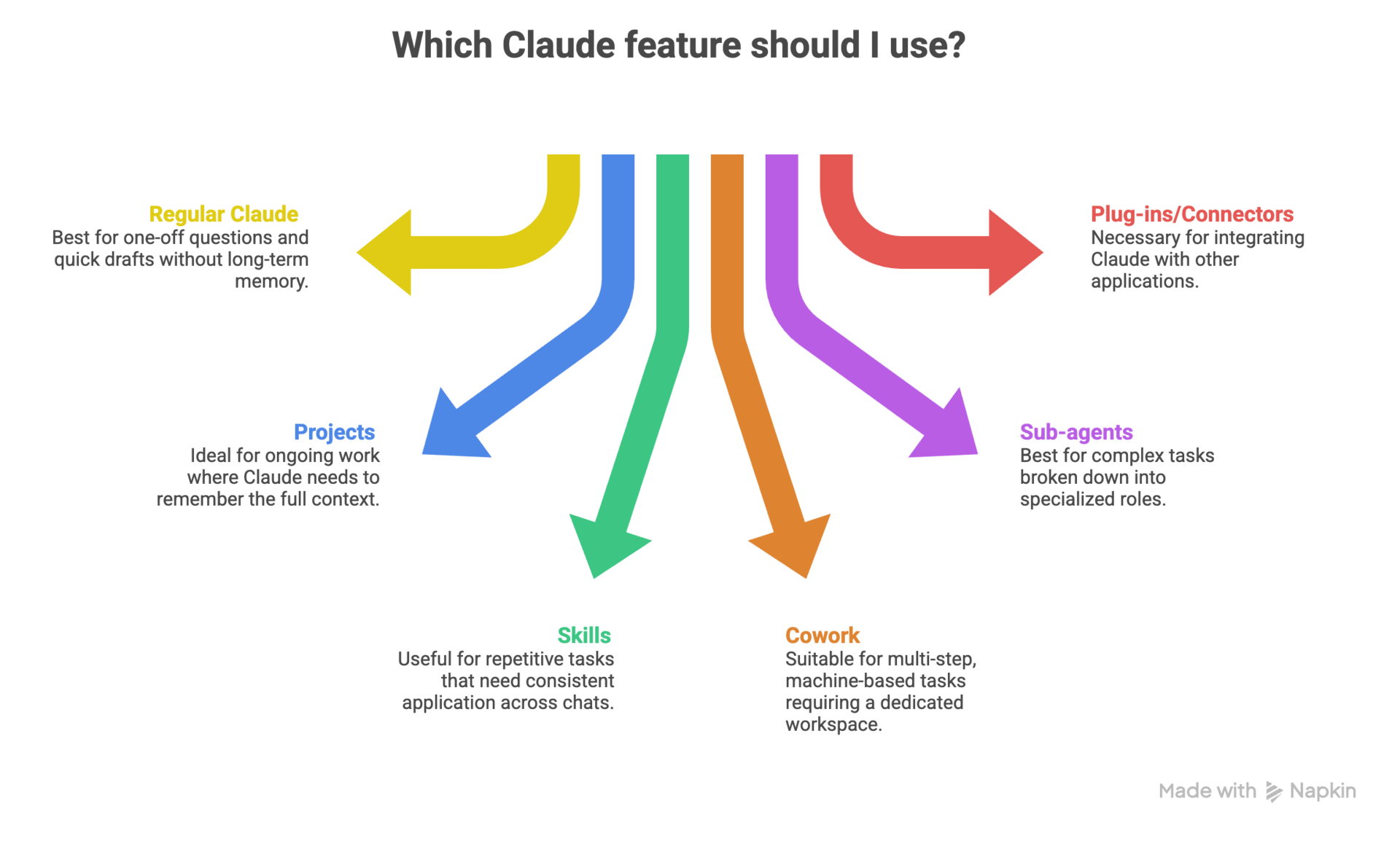
For most people upskilling in AI, the progression looks like this: start in regular Claude, graduate to Projects for anything important, then add Skills for your repeatable methods. Once those feel natural, you can let Cowork + connectors and, later, sub‑agents turn those saved methods into fully automated workflows.
End note
If you remember one thing from this issue, let it be this: Skills are reusable brains, not just longer prompts. Use them to capture how you do things – your brand voice, your way of structuring a PRD, your personal rules for a good sales email – so Claude can bring that with it into every new project instead of you copy‑pasting from a Notion graveyard.
Before you start experimenting with Claude Skills, here are some things to note:
Create separate folders/files for Claude Skills and resource files (knowledge base) from
SKILL.md). It is a game-changer for keeping things clean.Build small, focused "micro-skills" that chain together instead of one giant, monolithic skill. This is more reliable.
Always hand-edit the skills Claude generates. They're often too verbose and need to be refined to work consistently.
The real magic happens when you combine skills with hooks and MCP servers to automate complex workflows.
Do include real examples of what you want. Do test your skill a few times and tweak it. Don't expect perfection on the first try.
Here's your challenge: pick one thing, like planning product launches with workback schedules and RACI matrices, writing weekly status updates, or drafting client emails. Turn that into your first skill.

For example, a marketer could build a "Product Launch Planner" skill that classifies launches into tiers (major, significant, minor) and generates the right planning docs for each. Tier 1 launches get full campaigns with 8-12 week timelines. Tier 3 launches get streamlined 1-2 week plans. One skill, multiple scenarios, zero repeated prompting.
Start small. Build one. See what happens. Then come back and tell me what you created. I read every reply to these newsletters, and I want to hear what you build.
Share the love ❤️ Tell your friends!
If you liked our newsletter, share this link with your friends and request them to subscribe too.
Check out our website to get the latest updates in AI
Reply