- NanoBits
- Posts
- How I built an AI intern with Claude Cowork for LinkedIn, Sales, Trends, Newsletter
How I built an AI intern with Claude Cowork for LinkedIn, Sales, Trends, Newsletter
Nanobits Product Spotlight

Monalisa Sethi
February 01, 2026

EDITOR’S NOTE
Dear Nanobits Readers,
Claude Cowork dropped like a bomb in the AI community a couple of weeks back, and the internet has been having a collective existential crisis about it.
On X, @cryptopunk7213 asked "how big of a deal is Claude Cowork really?" and the replies ranged from "top 3 most exciting tech moments of my life" to "it just killed my company (and might kill yours too)".
Over on Reddit, one user reported it “deleted 11GB of files accidentally" during a folder cleanup, prompting a wave of nervous jokes about AI agents with delete permissions. The r/ClaudeAI community is split between people building entire research workflows and those treating it like a digital coworker who needs constant supervision.
As @AndrewCurran_ put it, we're all "getting Claude-pilled" - simultaneously amazed by what it can do and terrified of what it might do unsupervised.
Welcome to the agent era, where your AI coworker is brilliant, ambitious, and occasionally needs a babysitter.
What is Claude Cowork?
Claude Cowork is Anthropic's new "Claude Code for non-developers" - a macOS‑only agent that lives inside Claude Desktop and can autonomously execute multi‑step tasks on your computer. Unlike a regular chat where you get suggestions, Cowork actually does the work: it reads files, edits documents, browses websites, and orchestrates complex workflows while you grab coffee [or your choice of drink].
The architecture is impressive. It runs in a sandboxed Linux VM via Apple's Virtualization Framework, mounting only folders you explicitly grant access to. This means it literally cannot see your entire hard drive - just the directories you point it at. The agent uses an Observe‑Plan‑Act‑Reflect loop, breaking down your request into sub‑tasks, executing them, and showing you a live progress dashboard.
Think of it as hiring a very junior but incredibly fast analyst who works 24/7, never complains, but occasionally needs you to double‑check their work before they delete something important.
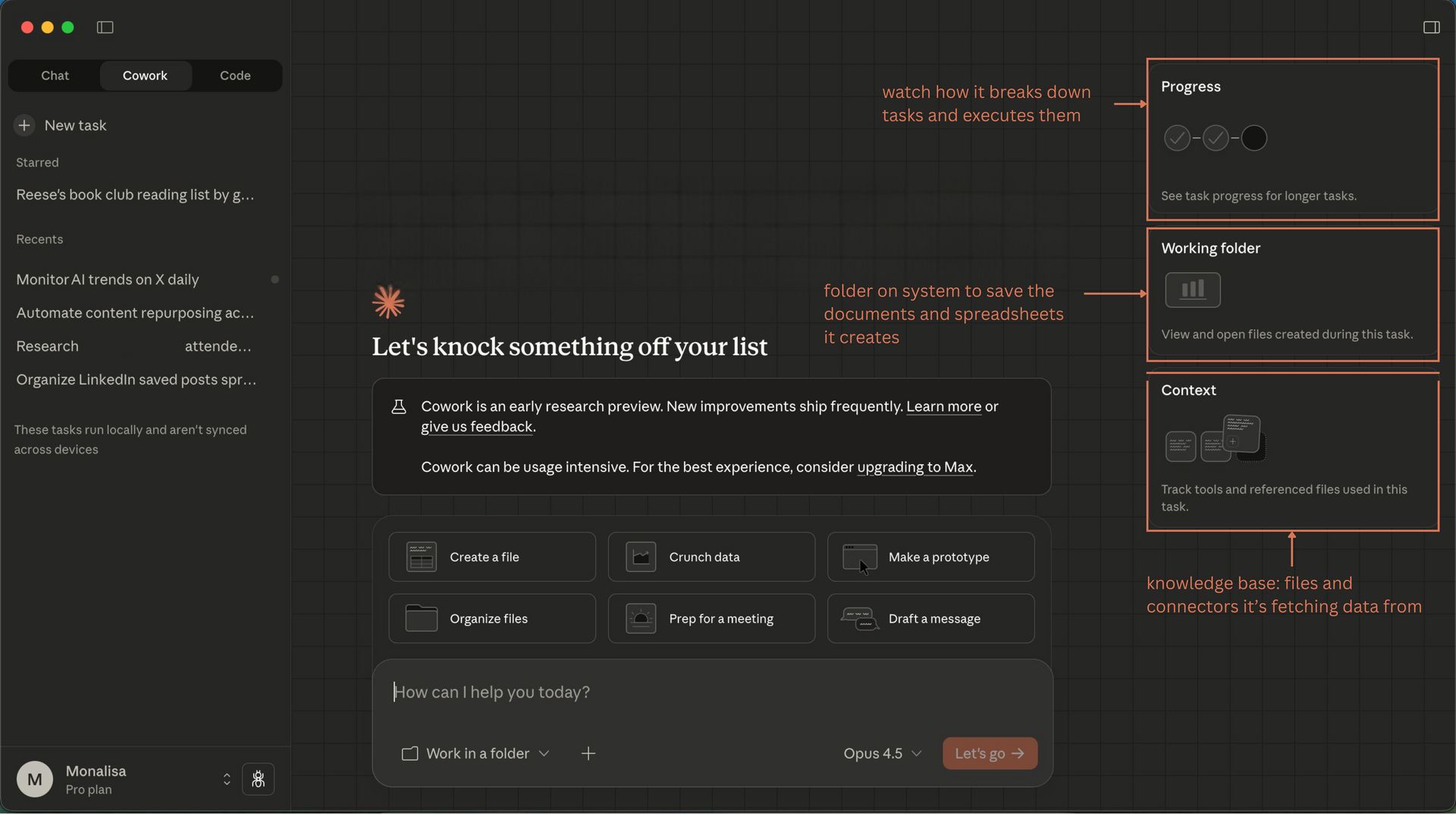
Claude Cowork Interface
The setup is super simple and takes less than 5 minutes. It’s currently available only on Mac. You need a Pro or Max account, the Claude desktop app, and Claude’s Google Chrome extension.
What are the features of Claude Cowork?
I spent a few days exploring how Cowork works and how it differs from regular Claude chat. Here’s a breakdown of what stood out to me:
1. File Access and Management
You pick a folder on your machine, grant Claude access, and then the AI can read, edit, and organize those files. This means messy folders can suddenly look tidy without you having to touch every file. It can generate spreadsheets from scattered data, create presentations from transcripts, and batch‑rename files based on content.
2. Autonomy on Tasks
Once you tell Claude what you want done, it builds a roadmap and works on it until completion, looping you in only when it needs direction or has results.
3. Multi-Task Queuing
You’re not limited to one thing at a time. Claude can take on multiple tasks at once and work through them while you do other things.
4. Connector Integration
Beyond folders, Claude Cowork can link to other apps via connectors. That means tasks involving web pages, external apps, or connected services become part of Claude’s to-do list.
5. Safety and Control Prompts
Claude will always ask before doing anything that might be risky like deleting or overwriting files. You stay in control at every step.
6. Multi-Platform Automation Potential
Some early experiments out in the world show that Cowork can even automate browser tasks or more complex workflows when paired with tools like browser connectors. For instance, it can visit websites, fill forms, pull data from public pages, and navigate through multi‑step flows - though some sites block automated browsing.
7. VM Isolation
The sandboxed approach means even if Cowork goes rogue, it's contained within the virtual machine and can't access your main system.
I can already think of four big wins for my workflow, and I’ll share them next.
Four things I actually did with Claude Cowork
1. Scraping LinkedIn saved posts into a structured insight engine
Like most marketers, my LinkedIn “Saved” folder is a graveyard of half‑remembered insights. I had 200+ saved posts about AI agents, GTM engineering, industrial saas, and a bunch of other things – all theoretically useful, practically inaccessible.
So I set up a Cowork task with one simple goal: turn my saved posts into a living Google Sheet I can sort, filter, and mine for ideas. I asked Cowork to pull my recently saved posts, then for each one extract the link, post type (text, carousel, video, PDF), the core CTA, publish date, and a 2–3 line summary. On top of that, I had it tag who the post was really for (marketers, GTM engineers, sales folks, founders, developers, product managers, etc.) and assign a “relevancy to me” score out of 100 based on my LinkedIn profile and the topics I typically save.
The result was a neatly structured sheet where every row is a saved post, and every column is a lever: I can filter for “high-relevance posts for product marketers,” find posts with strong CTAs to model for my own campaigns, or sort by topic to plan Nanobits issues. My “I’ll read this later” pile effectively turned into a personal insights database and content idea backlog, instead of a bottomless scroll I never revisit.
A couple of observations from my run here:

1. Some saved posts didn’t include their original links. That’s on the prompt design, so be sure to refine the prompt to explicitly pull the source URL.

2. I forgot to set a time range for the analysis, which made the search use more tokens than needed. Always define the date or range upfront.

3. Install the Claude Chrome extension before you start so the agent can crawl the pages you want.
2. Detailed event attendee research for hyper-personalized outreach
I'm also using Cowork as a pre-event SDR [sales development representative] for high-stakes sponsorships.
One of the cybersecurity clients I work with is sponsoring an event to generate a revenue pipeline for Q1 and Q2 of 2026, and instead of generic “looking forward to connecting” emails, I wanted real intel on every attendee so the leadership team could walk in with context. I dropped the attendee list and our sponsorship proposal into a Cowork workspace, then asked it to research each person’s posture relative to the relevant GTM [go-to-market] signals for this industry.
In plain terms: I used Cowork to figure out what each company is worried about, how they currently handle their data problems, and where their likely gaps are, so every outreach and conversation at the event feels specific, relevant, and grounded in their reality, not a generic security pitch.Cowork scraped public LinkedIn profiles, company websites, press releases, and regulatory filings, then wrote everything into a structured Excel sheet with one row per attendee and columns for each research dimension.
In the second pass, I asked it to draft personalized 4–5 line emails for each attendee, segmented by different pain points. The instructions were specific: no vendor buzzwords like "visibility" or "security transformation," no generic "let's connect" fluff. Instead, paint a realistic picture of how we can solve the problem statements, and make it feel like we actually understand their ground realities, not just pitching another security tool.
The result: a Word doc with tailored outreach for every attendee, each one backed with research, with a clear CTA to book a 30-minute 1:1 consultation at the event. It's the kind of prep work we've always wanted to do but never had time for, now automated, structured, and ready to execute.
Founders can use this same task at investor or founder meetups to map out who to talk to and plan their networking strategy.3. Monitoring AI Trends on X, Daily
The third experiment was turning Cowork into a lightweight “AI trend desk” for X.
I set up a workspace with a simple config file listing accounts and keywords I care about (AI agents, MCP, industrial AI, etc.). Each morning, Cowork logs in through the browser, pulls recent posts from that slice of X, and writes a short daily brief: top threads, recurring themes, any sharp contrarian takes, and a handful of posts worth saving.
Over a week, this turned into a rolling log of AI discourse that’s much more usable than doom‑scrolling. It surfaces patterns – for example, which aspects of agents people are actually shipping vs. just debating – and it gives me ready‑to‑go links and angles for Nanobits or LinkedIn.
4. Automating content repurposing of Nanobits (newsletters) across platforms
Finally, I pointed Cowork at my own back catalogue.
I copied a set of Nanobits issues into a workspace, along with a small “guide” file that explains how I write: tone, structure, and what I never do. Then I asked Cowork to:
Break each issue into atomic ideas.
Propose LinkedIn posts, short X threads, scripts for Instagram reelsm and a couple of Reddit discussion hooks per issue.
Tag each idea by theme.
Cowork produced a folder of repurposed drafts: LinkedIn posts that preserved my voice, X‑sized riffs on bigger essays, and a backlog of prompts I can reuse when I’m low on ideas. It’s not “auto‑publish” ready, but it’s a very solid first draft machine that keeps Nanobits alive across channels without me rewriting everything from scratch.
What else can you do with Claude Cowork?
Here are some proven workflows based on community use cases and my research:
Competitive Intelligence: Have Cowork monitor competitor websites, LinkedIn pages, and news mentions weekly. It'll generate a living markdown file tracking positioning shifts, feature releases, and messaging changes.
Customer Interview Synthesis: Drop 30 interview transcripts into a folder and ask for themes, quotes, and product insights. Cowork will identify patterns human analysts might miss.
Brand Monitoring: Track what people say about your brand across Reddit, X, LinkedIn, and industry forums. It'll synthesize sentiment, highlight recurring complaints, and flag emerging topics.
Creative Strategy Research: Feed it campaign briefs and have it analyze award‑winning campaigns in your category, identifying patterns in messaging, channels, and audience targeting.
And, the next use case is one of my favorites and pretty different from what one might be used to hearing:
Document Organization: One user organized thousands of pages of their deceased grandmum’s manuscripts by theme, chronology, and publication potential, to honour her legacy - a task that would have taken weeks manually. Claude didn’t just sort files; it gave them a path to share their grandmother’s voice with the world.
To get a sense of how big a swing Claude Cowork is:

Claude Code, the developer‑focused sibling, went from $0 to $1B revenue in less than 6 months and hit around $9B by the end of 2025, largely by quietly becoming the closest thing programmers have to AGI‑on‑the‑desktop.

Now Cowork takes that same magic and points it at everything non‑developers do on their computers, a market that’s at least an order of magnitude bigger, which is why many people see this as "the software launch of 2026."
How is Claude Cowork different from Perplexity Comet?
People keep asking, “Isn’t this just Perplexity Comet with extra steps?” Not quite.
Where they live: Cowork runs on your Mac inside a sandboxed VM, with direct access to the folders you mount and your local files; Comet lives in your browser, with deep awareness of your tabs, URLs, and web sessions.
What they’re best at: Cowork is best at file-heavy, multi-step desktop work – turning folders of docs, transcripts, and spreadsheets into decks, reports, and workflows. Comet is strongest at web-first work – live research, cross-site browsing flows, prospecting, and “do this across my open tabs” tasks with citations.
Mental model: Cowork is “Claude Code for non-devs” – a general-purpose agent that works inside your filesystem and connected tools. Comet is an “agentic browser” – a research and workflow copilot that works through the web.
In practice, I’ve found they’re complementary: I use Comet to discover and synthesize what’s happening out in the world, and Cowork to turn my own messy archives, saved posts, and event lists into structured assets and outreach that actually move projects forward.
The Good, The Bad, and The Ugly
The Good
It actually works: For file‑based knowledge work, Cowork delivers on the promise. Multi‑step research, synthesis, and document generation tasks that would take hours happen while you're in meetings.
Architecture is serious: The VM isolation and sandboxing aren't marketing fluff. Technical users confirm it genuinely can't access unmounted folders, which is the right foundation for an agent with file permissions.
Developer‑Grade Power for Non‑Developers: The UX makes Claude Code's capabilities accessible to marketers, PMs, and founders who don't live in terminals.
The Bad
It eats tokens for breakfast: A single session can burn 200K+ tokens. Running this weekly on a Pro plan ($20/month) is feasible; daily use requires Max ($100–$200/month).
Platform limited: Mac‑only for now. Windows is "planned," which excludes most enterprise users.
Stability issues: Users report workspace startup failures, flaky browser automation, and occasional connector timeouts. It's research preview quality, not production‑ready.
The Ugly
Data loss is real: The infamous "11GB deleted" incident wasn't a hallucination. When Cowork deletes files, there's no Trash recovery - it's gone from the mounted folder. The community consensus: never point it at original files, only copies in dedicated workspaces.
Security is unsolved: Prompt injection vulnerabilities exist. A responsibly disclosed bug showed how hidden instructions in documents could exfiltrate local files. The sandbox helps, but the combination of internet access, file access, and powerful tools creates attack surfaces that aren't fully mitigated.
Human factor risk: The UI is friendly enough that non‑technical users might approve destructive actions they don't understand. One wrong "yes" on a cleanup plan can vaporize a project folder.
End note: The Agent era is here, but keep your guard up
Claude Cowork is the clearest signal yet that AI agents are moving from demos to daily work. For content marketers, competitive researchers, and founders, it compresses days of manual labor into hours of autonomous execution. The playbook is simple: copy, don't point; read, don't write; approve, don't assume.
Start with isolated folders, read‑only connectors, and tasks you can afford to lose. Think of Cowork as a brilliant intern who needs training wheels, not a fire‑and‑forget autopilot.
The infrastructure is sound. The use cases are real. The economics are... pricey. But if you're strategic about what you automate and paranoid about what you expose, Cowork can be the force multiplier that justifies its token appetite.
Welcome to the era of digital coworkers. Choose your projects wisely, back up your data religiously, and keep the human in the loop.
Share the love ❤️ Tell your friends!
If you liked our newsletter, share this link with your friends and request them to subscribe too.
Check out our website to get the latest updates in AI
Reply