- NanoBits
- Posts
- Forget Figma. Google Stitch just became the fastest way to design your AI app
Forget Figma. Google Stitch just became the fastest way to design your AI app
I rebuilt Spotify's entire design system in 30 minutes - no designer, no Figma, just one prompt

Geetika Mehta
March 22, 2026

EDITOR’S NOTE
Dear Nanobits Readers,
Imagine this. You have an app idea. You open an AI coding tool, describe what you want, and in twenty minutes you have something that actually works. The logic is right. The data flows. And then you open it in the browser and it looks like it was assembled by someone who has never used a real product in their life. Flat grey cards. A font that came pre-installed on a 2009 laptop. A color palette that says "I pressed generate and accepted the default."
This is the AI slop problem. And if you have built anything with Bolt, Lovable, or even Claude Code, you have felt it.
Now imagine the flip side. You are a product manager trying to get a team aligned on a new feature, and the fastest way to do that is a visual but you're not opening Figma at 11pm to manually build wireframes. Or you're a founder who needs to show investors something real in 48 hours, not a slide deck with boxes and arrows. Or you're a designer who wants to explore six layout directions before committing to one, without burning a week to do it.
Google just shipped an update to Stitch that is genuinely trying to solve all of this, for builders, PMs, designers, and founders alike. The headline feature is called design.md, and I spent a few days testing it, including rebuilding a full Spotify-inspired music app experience from scratch. Here's the full picture, the exciting, the practical, and the parts they still haven't figured out.

Let's jump right into the details.
What is Google Stitch now?
A quick bit of history first. Stitch started its life as Galileo AI, a startup Google acquired in 2025 and rebranded. In its earlier form it was a simple text-to-UI tool: describe a screen, get a mockup, move on. Useful for a quick sketch, not much else.
The latest version is a completely different product: a full AI-native canvas where you can bring ideas in whatever form they take: images, text, sketches, or code directly onto the canvas as context. Think of it the way you think about Claude Code for developers, except Stitch is that for everyone who needs to design something and doesn't want to spend three hours in Figma to do it.
The tool runs on Gemini models: Standard Mode uses Gemini 2.5 Flash for speed, while Experimental Mode uses Gemini 2.5 Pro for more detailed, refined outputs. You pick based on what you need: fast exploration or careful execution.

The Feature that Actually Changes Things: Design.md
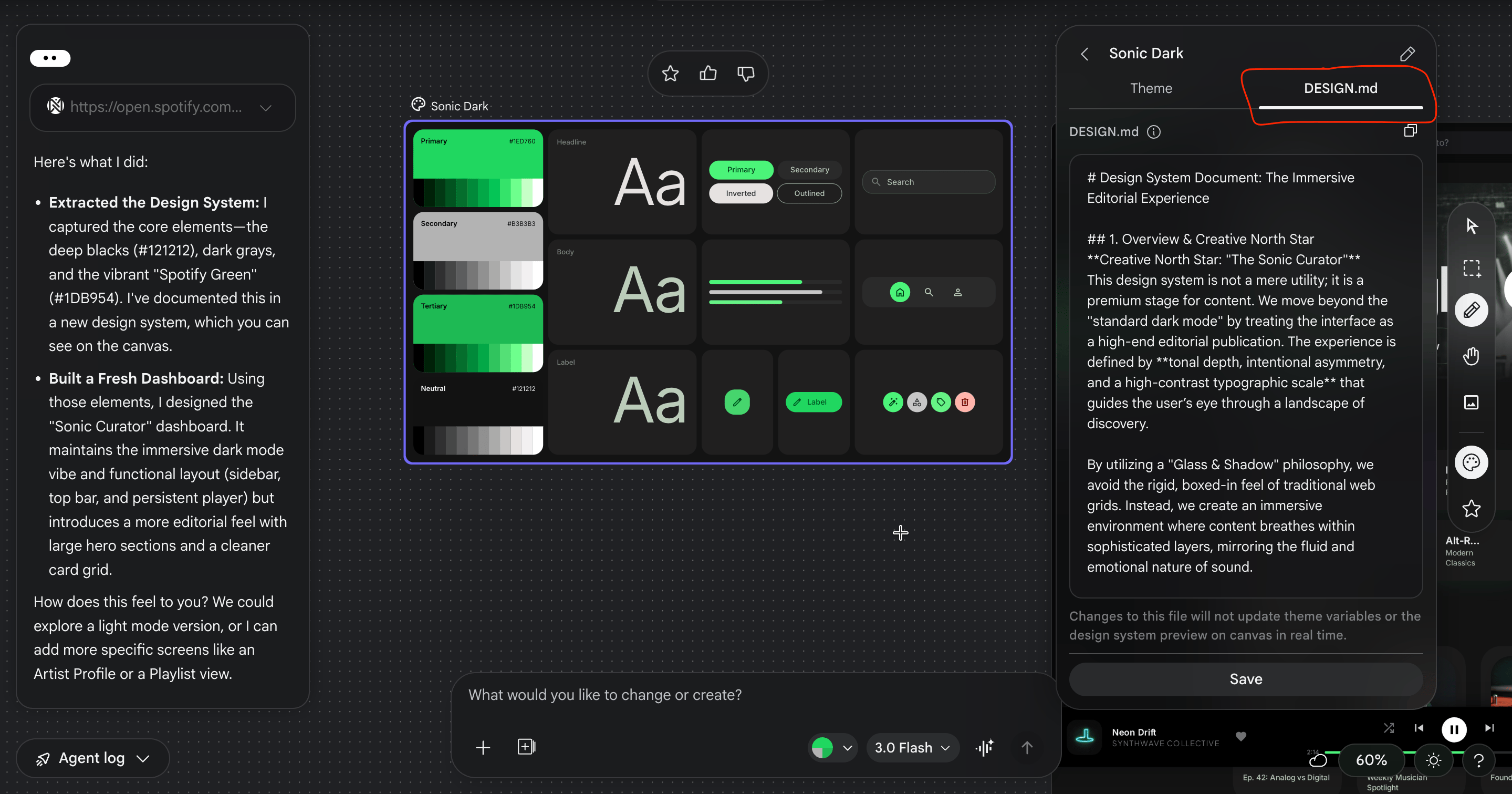
If you have used CLAUDE.md or agents.md in a coding project, you already understand the concept. Design.md is a markdown file that captures your entire design system, colors with exact hex codes, typography scales, spacing rules, component patterns, dos and don'ts in a format that any AI coding tool can read and follow consistently.
Before this existed, the workflow looked like this: design something carefully → try to describe it to an AI coder → watch it ignore half your choices, invent the rest, and produce something that looks nothing like what you had in mind. Every single time.
Design.md is the translation layer, you can export or import your design rules to or from other design and coding tools, so you don't have to reinvent the wheel every time you start a new project. And critically, Stitch generates it automatically as you design. You don't write it. You design, and it documents itself.
What ends up inside it: your full color palette with hex codes and tonal scales, your typography hierarchy from display headings down to body labels, component-level rules with visual examples, spacing tokens, and rules framed explicitly as dos and don'ts so an AI coder can't misinterpret them. It's not just documentation. It's a design contract your coding tool has to honour.
What Else is New?
URL ingestion. You can extract a design system from any URL, drop a live website into the canvas and Stitch pulls out the colors, fonts, and component style automatically. Useful if you're redesigning an existing product or matching an established brand.
Smarter design agent. You can speak directly to the canvas via voice to describe your design needs, generate new interfaces, modify existing ones, or get real-time design critiques where the AI proactively flags poor contrast or unclear layouts.
Instant prototypes. Select screens, hit Play, and Stitch wires them into a clickable flow, it can even automatically generate logical next screens based on a click, mapping out user journeys effortlessly.
Attention heatmaps. Select any screen, go to Generate → Predicted Heatmap, and Stitch shows you where users' eyes will land first. It's an attention audit before you write a single line of code.
Stitch MCP. For Claude Code users, there's now an MCP server that gives Claude direct access to your Stitch designs, not just the markdown file, but the actual HTML and CSS behind every frame. The design stops being a reference and becomes a live source of truth.
Export to AI Studio. Push your designs directly to Google AI Studio and prompt it to generate a full Next.js app with authentication and a database. The design-to-deployment loop, without leaving Google's ecosystem..
I Rebuilt Spotify’s Design Language With It
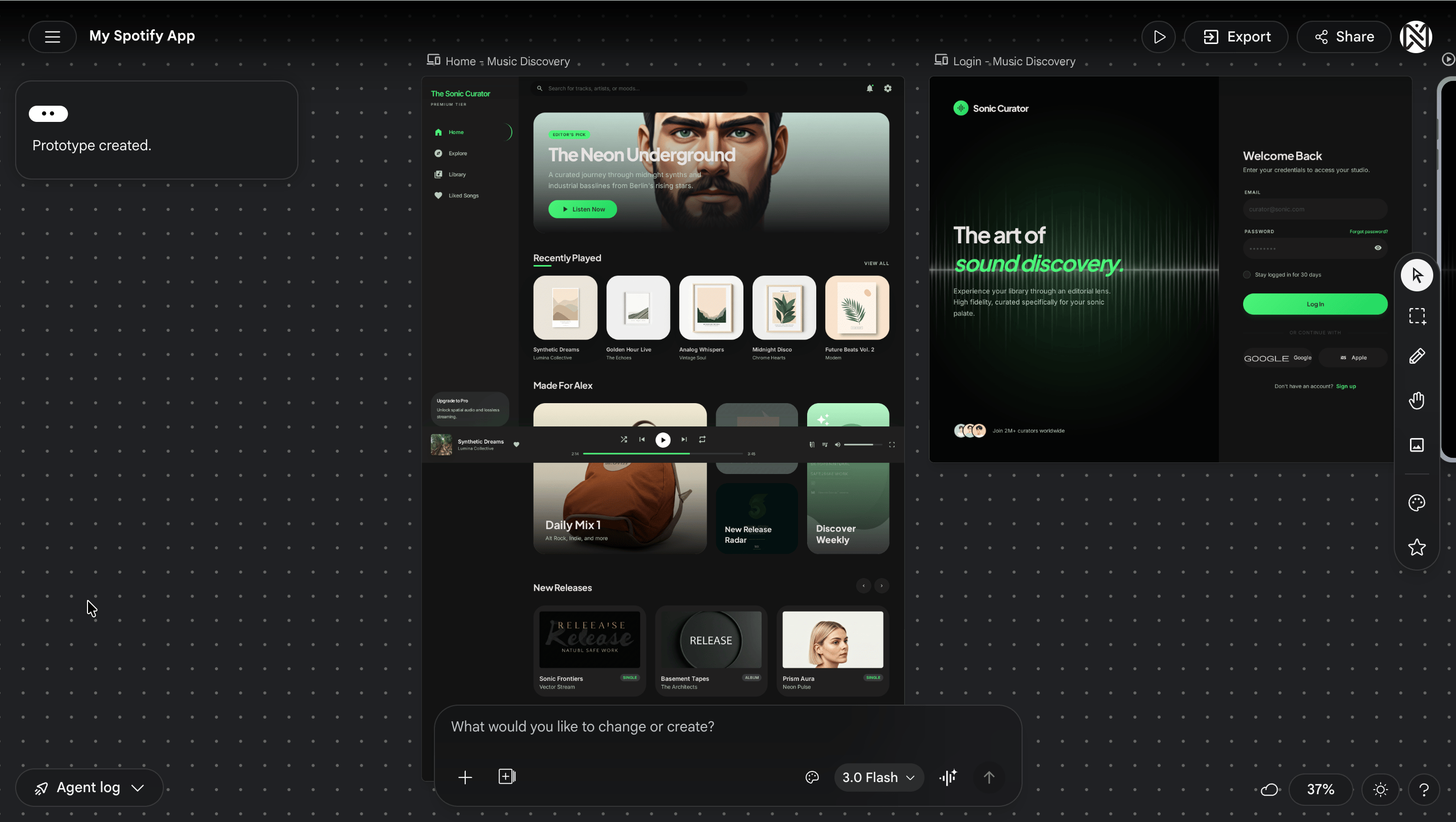
To stress-test all of this, I decided to do something ambitious: take Spotify's design DNA and rebuild it as an original music experience, same aesthetic logic, different product. Dark mode, strong typography, album art as the visual hero, clean sidebar navigation.
What I fed into Stitch: Spotify's homepage URL. My prompt asked it to extract the full design system, create a design.md, and then design an original web dashboard carrying the same vibe.
Within two minutes: the near-black background palette pulled cleanly, the signature green accent came through with accurate hex values, a font pairing captured Spotify's Circular feel without using the proprietary typeface, and the card-grid layout logic felt immediately right. The design.md it generated was detailed enough to hand directly to a coding tool and expect a coherent output.

Three screens, three prompts:
Home / Discovery Feed — left sidebar, horizontally scrolling card rows for Recently Played, Made For You, and New Releases. One prompt. Two minutes.
Now Playing — large album art left, song info and progress bar center, queue right. I asked for an ambient color glow behind the album art that pulls from the album's dominant color. First try, it worked. That's the kind of detail that separates a polished product from a generic one.

Library / Playlist page — card grid with a featured hero banner at the top. Clean and done.

For each screen you can Generate Variations, upto three interpretations of the same brief in thirty seconds. This alone is worth the price of admission. You stop agonizing over a single direction and start choosing between real options.
The heatmap check: I ran the attention heatmap on the Now Playing screen. Eyes landed on album art first (correct), then song title, then skipped the progress bar entirely and landed on the queue. Wrong hierarchy for a music player. I prompted a fix and the revised version tested noticeably better.

Taking it to code: I exported the design.md, opened it in my project, and used it as the reference file for Claude Code. The output was noticeably more consistent than anything I had got from AI coding tools previously, about 80-85% color fidelity, fonts needed a manual pass, but the foundation was solid and the direction was unmistakable.
My Honest Take
Real-world users and reviewers have been fairly consistent in what they love and where the cracks show.
What genuinely works: It understands design context: mobile vs web, B2B vs consumer, applies appropriate UI patterns like cards, tabs, and forms, generates realistic placeholder content, and maintains consistent spacing and typography hierarchy. One PM at a fintech startup noted it replaced a $5,000 designer cost for early-stage concept validation. A founder built 15 screen mockups for an investor pitch in two hours.
The designer workflow in practice looks like this: use Stitch to generate 3-5 concept directions in 5 minutes, export the best option to Figma, refine brand colors and fonts in 30 minutes, iterate conversationally back in Stitch for another 10 minutes, and do a final polish for handoff in 20. Total: 65 minutes versus 4-6 hours manually.
Where it falls short: Stitch's outputs often default to a limited set of layout structures, many designs end up looking alike, with only minor variations. It also struggles to meet basic accessibility requirements like color contrast and touch target sizes, so you'll need to review and adjust for anything shipping to real users.
It works well for basic use but lacks deeper integration with existing design systems and structured workflows. Complex multi-step flows are still a weak spot, it's hard to generate more than 2-3 screens coherently, and it's not well-suited for longer user journeys.
And it lives in Google's ecosystem. If your stack is heavily third-party, some of the deeper integrations won't apply to you.
What This Means For You
Product Managers: This is your new best tool for sprint kickoffs. Instead of describing a feature in a doc and hoping everyone imagines the same thing, you can show up to alignment meetings with a clickable prototype you built in forty-five minutes the night before. Stitch removes the "I'll need a designer to visualize this" bottleneck from your workflow entirely.
Designers: The blank canvas problem is solved. Generate five directions from a brief in the time it used to take to open a new Figma file. The real value isn't replacing your craft, it's front-loading exploration so that by the time you're doing detailed design work, you've already pressure-tested the directions that don't work. Stitch does the diverging. You do the converging.
Engineers: The design.md file is built for you. Instead of receiving a Figma link and spending hours trying to reverse-engineer what the designer intended, you get a structured markdown document with exact hex codes, spacing tokens, and explicit rules. Feed it to your AI coding tool and the output will actually look like the design.
Founders and Solo Builders: This is the tool that finally closes the gap between "I built it" and "it looks like something people would actually pay for." If you've been shipping products that work but look like AI slop, Stitch is worth an afternoon of your time this week
What This Means for The Design Landscape
It would be reductive to dismiss what the existing players have built. Figma remains the standard for collaborative, production-grade design, its component libraries, version history, and team workflows are years ahead of where Stitch is today. v0 by Vercel owns the design-to-functional-code space for developers who need React components fast. Framer leads on complete website builders with real interactivity. And tools like UX Pilot have been doing parts of this workflow for longer.
What Stitch is doing differently is the integration play, connecting design generation, design systems, prototyping, coding, and deployment inside one Google-backed ecosystem with an MCP server that ties it to the tools developers are already using. No single competitor currently owns that full loop. Whether Stitch executes on it well enough to matter is the open question. But the direction is right, and the pace of improvement over the past year suggests they're not slowing down.
Try It Yourself
Go to
stitch.withgoogle.com— free, no waitlistStart a new Web project
Drop in a URL or 3-4 screenshots of a design you admire
Prompt: "Extract the design system and create a design.md. Then design [your screen] in dark mode / minimal / your preferred aesthetic."
Use Generate Variations on each screen — pick the strongest
Run a Predicted Heatmap on your most important screen
Select 2+ screens → hit Prototype
Export design.md and paste it into your project folder — reference it in every AI coding prompt from here
Claude Code users: search "Google Stitch MCP setup" and install the MCP server. It gives Claude direct access to your Stitch frames, not just the markdown.
END NOTE
Design.md is not a finished paradigm. But the problem it's solving — design intent getting lost in translation when it meets an AI coding tool — is one of the most frustrating and universal problems in building products with AI today.
For the first time, there's a tool that creates a living document of your design decisions and puts it directly in the hands of the AI that's building your code. That's the shift. Not "AI can design now." But "your design decisions can finally survive contact with the tools building your product."
Go build something that doesn't look like slop.
Check out the full video of the Spotify like app that I build..
Until next time!
If you liked our newsletter, share this link with your friends and request them to subscribe too.
Reply